
Global Waters
- Global Waters
- 2018
Case Study Overview
Client: USAID – Global Waters Program
Timeline: Multi-phase redesign and optimization
My Role: Web Development Specialist
Tools Used: Figma, Adobe Photoshop, Drupal 7/8, HTML5, CSS3, JavaScript, jQuery, Bootstrap, PHP, MySQL
Project Summary:
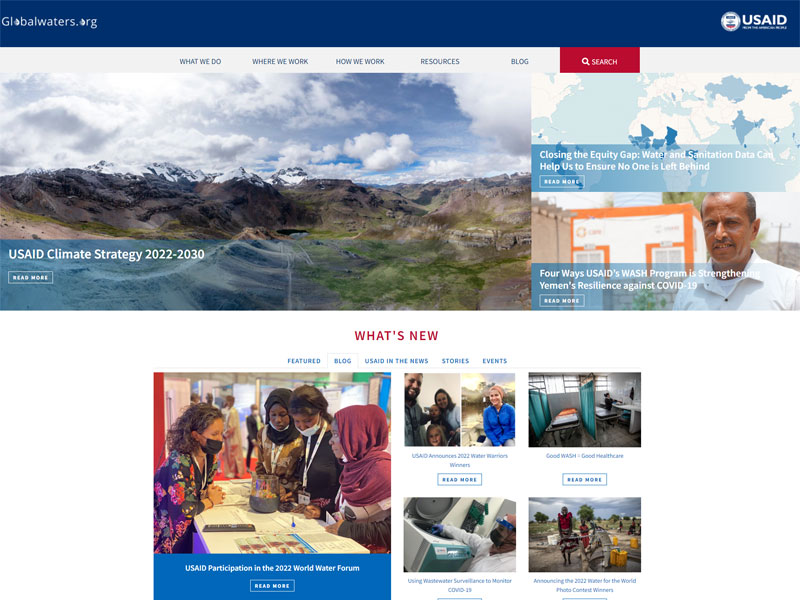
GlobalWaters.org serves as the primary knowledge-sharing platform for USAID's global water, sanitation, hygiene (WASH), and climate resilience programs. The project focused on modernizing the user experience, improving accessibility, strengthening content discovery, and optimizing front-end performance, while protecting the integrity of a large, data-heavy Drupal ecosystem.
The Challenge
The legacy Global Waters platform had grown organically over many years. While rich in content, it presented several usability and performance challenges:
- Overcrowded layouts and inconsistent visual hierarchy
- Difficult navigation for first-time users
- Limited mobile optimization
- Accessibility gaps that affected screen reader and keyboard users
- Legacy Drupal theming that restricted visual flexibility
- Performance bottlenecks caused by unoptimized assets
The challenge was to modernize the experience without disrupting critical government workflows, content structures, or multilingual publishing needs.
Goals & Objectives
The legacy Global Waters platform had grown organically over many years. While rich in content, it presented several usability and performance challenges:
- Improve content discoverability and user navigation
- Establish a clean, modern visual system aligned with USAID branding
- Enhance accessibility to meet WCAG / Section 508 requirements
- Optimize performance and front-end efficiency
- Improve mobile responsiveness
- Support frequent content updates from non-technical editors
- Maintain Drupal scalability and security
Research Process
Methods Used:
- UX heuristic evaluation
- Analytics review of high-exit and low-engagement pages
- Stakeholder interviews
- Content audits
- Accessibility testing with WAVE and manual keyboard testing
Key Findings:
- Users struggled to locate updated reports and featured programs
- Homepage content lacked clear priority hierarchy
- Mobile users experienced usability issues with navigation
- Some content-heavy pages caused cognitive overload
These insights directly shaped the redesign strategy.
Information Architecture
I worked closely with content strategists and developers to:
- Reorganize homepage content blocks for clearer storytelling
- Improve top-level navigation structure
- Simplify content pathways for:
- What We Do
- Where We Work
- Resources
- Blogs & Stories
This created faster access to high-value research, funding resources, and climate strategy content.
Wireframes & Ideation
Low-fidelity wireframes were created to:
- Test new homepage content hierarchy
- Simplify featured content layouts
- Improve readability of longer articles
- Reduce unnecessary page depth
Multiple concepts were tested internally before arriving at a modular block-based layout that scaled across program areas.
Visual Design System
The final UI design system emphasized:
- Strong visual hierarchy
- High-contrast typography for accessibility
- Clean grid structure
- Modular content cards
- Consistent CTA placement
- Optimized media presentation
The system aligned with USAID's brand standards, while giving editors greater flexibility to highlight timely initiatives.
Prototypes & Interaction Design
Interactive prototypes demonstrated:
- Homepage feature rotations
- Expanded resource filtering
- Improved article layouts
- Fully responsive navigation behaviors
These prototypes ensured stakeholder alignment before development.
Front-End Development
Work performed on site building:
- Refactored Drupal 7 PHP themes and JavaScript behaviors
- Built responsive layouts using Bootstrap and custom CSS
- Developed custom UI components and widgets
- Optimized image sprites and asset delivery
- Implemented Twig/YAML-based theming strategies for Drupal 8 migration planning
- Tested cross-browser compatibility and performance
This ensured the platform was both design-forward and technically resilient.
Accessibility Enhancements
Accessibility was a core priority:
- Improved color contrast across navigation and CTAs
- Added ARIA labels for screen readers
- Ensured full keyboard navigation
- Improved focus states and tab order
- Conducted WCAG validation using WAVE and manual audits
These updates significantly enhanced usability for visually impaired users.
Usability Testing
Usability testing included:
- Staff moderators testing navigation flow
- NGO partners reviewing content clarity
- Accessibility users validating screen reader behavior
Feedback directly informed refinements to layout density, content hierarchy, and interactive elements.
Final Solution
The finalized platform delivered:
- A modern, clean homepage design
- Clear featured content rotation
- Modular news and resource sections
- Strong storytelling through imagery
- Fully responsive behavior
- Improved discoverability of climate strategy content
The homepage now functions as a high-impact information gateway for global water initiatives.
Impact & Outcomes
- Improved content engagement and conversion rates
- Faster page-load performance through optimized assets
- Stronger mobile usability
- Increased accessibility compliance
- More efficient editorial publishing workflows
- Higher usability scores during internal evaluations
Lessons Learned
- Government platforms must balance innovation with stability
- Accessibility must be embedded from the start, not added later
- Modular design systems significantly improve long-term scalability
- Close synchronization between UX and Drupal development is critical
My Contribution
- Led UX evaluation and front-end optimization
- Designed wireframes and responsive layouts
- Built and optimized Drupal UI components
- Led accessibility remediation efforts
- Supported Drupal 7 to 8 architecture planning
- Optimized performance and asset delivery
- Collaborated with content managers and federal stakeholders
Software and Tools Used
- Figma
- Adobe Photoshop
- Drupal 7 & 8
- HTML5, CSS3, JavaScript, jQuery
- Bootstrap
- PHP, MySQL
Final Thoughts
The Global Waters redesign strengthened the platform's ability to communicate mission-critical water and climate initiatives across a global audience. The work blended UX strategy, accessibility engineering, and front-end development to create a system that is scalable, inclusive, and editorially sound.
This project highlights the ability to support in the modernization of complex federal platforms, while maintaining performance, compliance, and usability at enterprise scale.